Password reset
Learn how the password reset functionality works
Overview
The password reset feature consists of two actions: one in which a user requests a reset password link over email and another where the user sets the new password.
The password reset forms
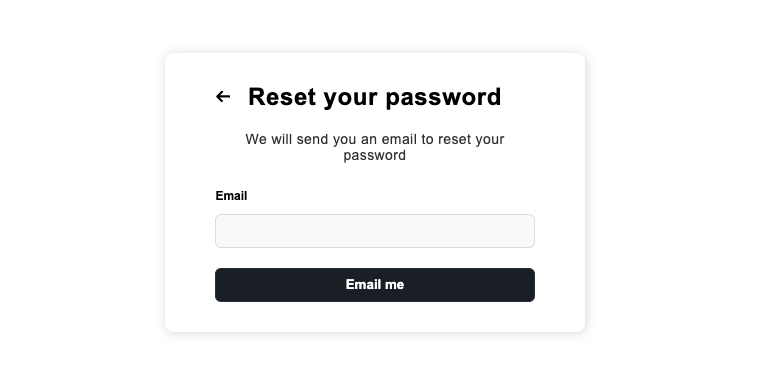
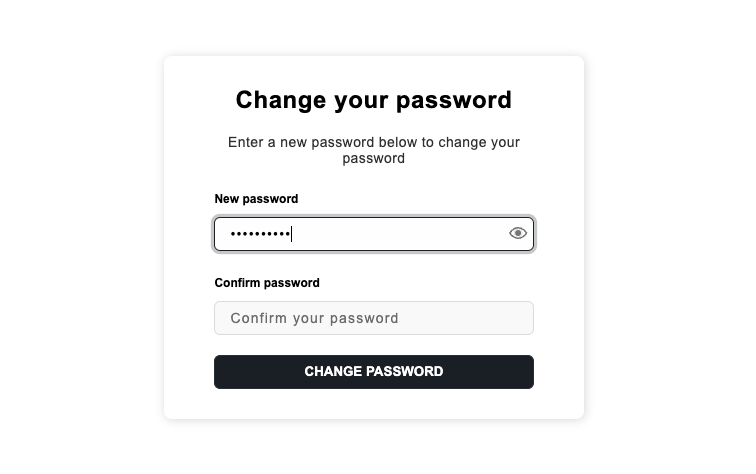
The following images show how the password reset forms render when you are using the pre-built UI.
You see this if you navigate to /auth/reset-password.
You see this if you navigate to /auth/reset-password?token=TOKEN.
To implement your own interface create two different forms:
- One where the user requests a password reset link.
- Another one where the user changes their password.
Use the pre-built UI components as a reference.
The password reset email
This is how the email that gets delivered to the learner looks like:
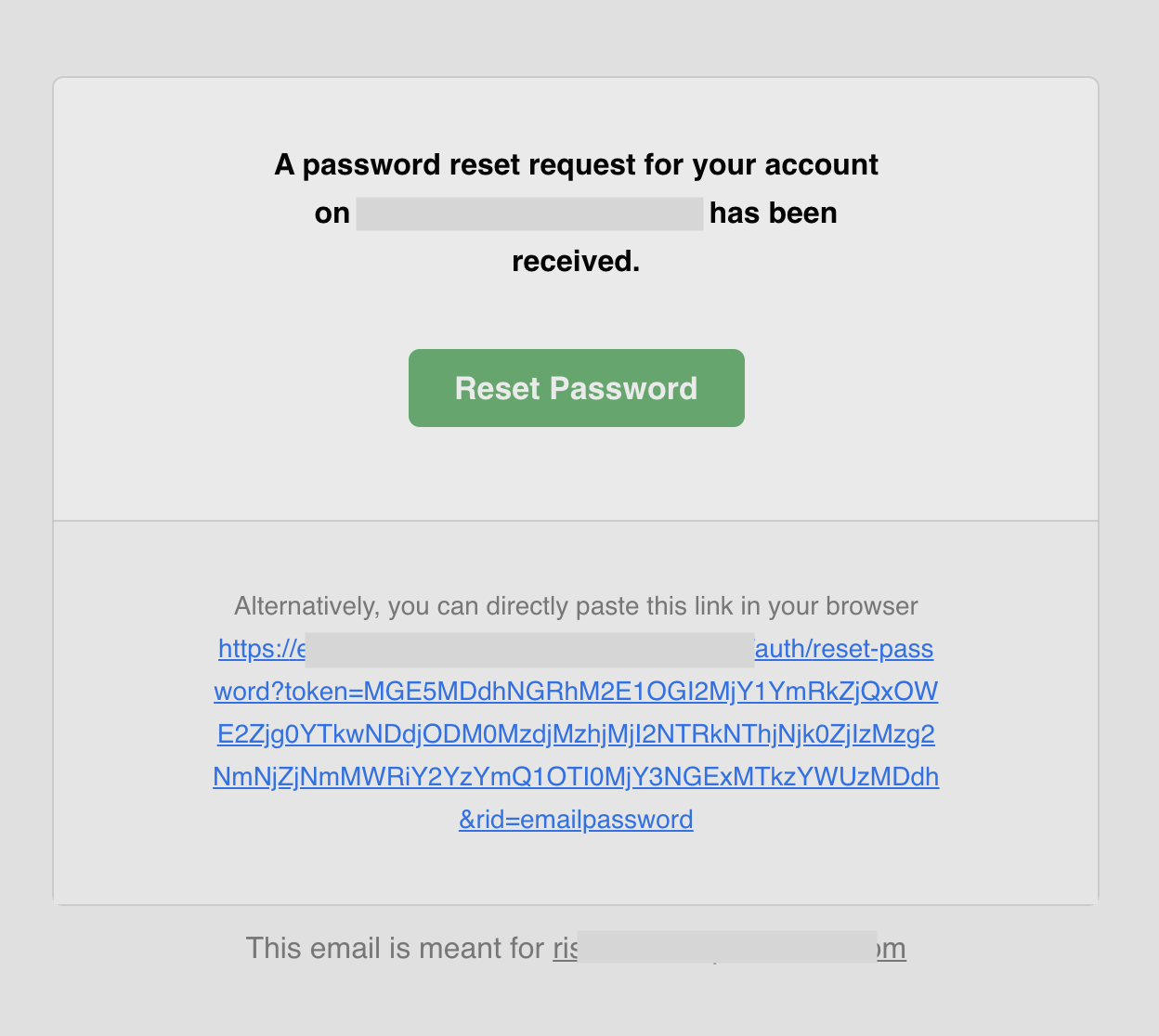
You can find the source code of this template on GitHub. To customize the template check the email delivery section for more information.
Embed the reset form in a page
To embed the reset form in a page you can use the next steps.
1. Disable the default implementation
import SuperTokens from "supertokens-auth-react";
import EmailPassword from "supertokens-auth-react/recipe/emailpassword";

SuperTokens.init({
  appInfo: {
    apiDomain: "...",
    appName: "...",
    websiteDomain: "...",
  },
  recipeList: [
    EmailPassword.init({
      resetPasswordUsingTokenFeature: {
        disableDefaultUI: true,
      },
    }),
  ],
});
// this goes in the auth route config of your frontend app (once the pre-built UI script has been loaded)
supertokensUIInit({
appInfo: {
apiDomain: "...",
appName: "...",
websiteDomain: "...",
},
recipeList: [
supertokensUIEmailPassword.init({
resetPasswordUsingTokenFeature: {
disableDefaultUI: true,
},
}),
],
});If you navigate to /auth/reset-password, you should not see the widget anymore.
2. Render the component yourself
Add the ResetPasswordUsingToken component in your app:
import React from "react";
import { ResetPasswordUsingToken } from "supertokens-auth-react/recipe/emailpassword/prebuiltui";

class ResetPasswordPage extends React.Component {
  render() {
    return (
      <div>
        <ResetPasswordUsingToken />
      </div>
    );
  }
}3. Change the website path for reset password UI
This step is optional.
The default path for this is component is /auth/reset-password.
If you are displaying this at some custom path, then you need to add additional configuration on the backend and frontend:
3.1 On the backend
import SuperTokens from "supertokens-node";
import EmailPassword from "supertokens-node/recipe/emailpassword";

SuperTokens.init({
  supertokens: {
    connectionURI: "...",
  },
  appInfo: {
    apiDomain: "...",
    appName: "...",
    websiteDomain: "...",
  },
  recipeList: [
    EmailPassword.init({
      emailDelivery: {
        override: (originalImplementation) => {
          return {
            ...originalImplementation,
            sendEmail: async function (input) {
              if (input.type === "PASSWORD_RESET") {
                return originalImplementation.sendEmail({
                  ...input,
                  passwordResetLink: input.passwordResetLink.replace(
                    // This is: `<YOUR_WEBSITE_DOMAIN>/auth/reset-password`
                    "http://localhost:3000/auth/reset-password",
                    "http://localhost:3000/your/path",
                  ),
                });
              }
              return originalImplementation.sendEmail(input);
            },
          };
        },
      },
    }),
  ],
});
import (
"strings"
"github.com/supertokens/supertokens-golang/ingredients/emaildelivery"
"github.com/supertokens/supertokens-golang/recipe/emailpassword"
"github.com/supertokens/supertokens-golang/recipe/emailpassword/epmodels"
"github.com/supertokens/supertokens-golang/supertokens"
)
func main() {
supertokens.Init(supertokens.TypeInput{
RecipeList: []supertokens.Recipe{
emailpassword.Init(&epmodels.TypeInput{
EmailDelivery: &emaildelivery.TypeInput{
Override: func(originalImplementation emaildelivery.EmailDeliveryInterface) emaildelivery.EmailDeliveryInterface {
ogSendEmail := *originalImplementation.SendEmail
(*originalImplementation.SendEmail) = func(input emaildelivery.EmailType, userContext supertokens.UserContext) error {
// This is: `<YOUR_WEBSITE_DOMAIN>/auth/reset-password`
input.PasswordReset.PasswordResetLink = strings.Replace(
input.PasswordReset.PasswordResetLink,
"http://localhost:3000/auth/reset-password",
"http://localhost:3000/your/path", 1,
)
return ogSendEmail(input, userContext)
}
return originalImplementation
},
},
}),
},
})
}from supertokens_python import init, InputAppInfo
from supertokens_python.recipe.emailpassword.types import EmailDeliveryOverrideInput, EmailTemplateVars
from supertokens_python.recipe import emailpassword
from typing import Dict, Any
from supertokens_python.ingredients.emaildelivery.types import EmailDeliveryConfig
def custom_email_deliver(original_implementation: EmailDeliveryOverrideInput) -> EmailDeliveryOverrideInput:
original_send_email = original_implementation.send_email
async def send_email(template_vars: EmailTemplateVars, user_context: Dict[str, Any]) -> None:
# This is: `<YOUR_WEBSITE_DOMAIN>/auth/reset-password`
template_vars.password_reset_link = template_vars.password_reset_link.replace(
"http://localhost:3000/auth/reset-password", "http://localhost:3000/your/path")
return await original_send_email(template_vars, user_context)
original_implementation.send_email = send_email
return original_implementation
init(
app_info=InputAppInfo(api_domain="...", app_name="...", website_domain="..."),
framework='...',
recipe_list=[
emailpassword.init(
email_delivery=EmailDeliveryConfig(override=custom_email_deliver)
)
]
)3.2 On the frontend
import SuperTokens from "supertokens-auth-react";
import EmailPassword from "supertokens-auth-react/recipe/emailpassword";

SuperTokens.init({
  appInfo: {
    apiDomain: "...",
    appName: "...",
    websiteDomain: "...",
  },
  recipeList: [
    EmailPassword.init({
      // The user will be taken to the custom path when they click on forgot password.
      getRedirectionURL: async (context) => {
        if (context.action === "RESET_PASSWORD") {
          return "/custom-reset-password-path";
        }
      },
    }),
  ],
});
// this goes in the auth route config of your frontend app (once the pre-built UI script has been loaded)
supertokensUIInit({
appInfo: {
apiDomain: "...",
appName: "...",
websiteDomain: "...",
},
recipeList: [
supertokensUIEmailPassword.init({
// The user will be taken to the custom path when they click on forgot password.
getRedirectionURL: async (context) => {
if (context.action === "RESET_PASSWORD") {
return "/custom-reset-password-path";
}
},
}),
],
});Generate a reset link manually
You can use the backend SDK to generate the reset password link as shown below:
import EmailPassword from "supertokens-node/recipe/emailpassword";

async function createResetPasswordLink(userId: string, email: string) {
  const linkResponse = await EmailPassword.createResetPasswordLink("public", userId, email);

  if (linkResponse.status === "OK") {
    console.log(linkResponse.link);
  } else {
    // user does not exist or is not an email password user
  }
}
import (
"fmt"
"github.com/supertokens/supertokens-golang/recipe/emailpassword"
)
func main() {
userID := "..."
linkRes, err := emailpassword.CreateResetPasswordLink("public", userID)
if err != nil {
// handle error
}
if linkRes.OK != nil {
link := linkRes.OK.Link
fmt.Println(link)
} else {
// user does not exist or is not an email password user
}
}from supertokens_python.recipe.emailpassword.asyncio import create_reset_password_link
async def create_link(user_id: str, email: str):
link = await create_reset_password_link("public", user_id, email)
if isinstance(link, str):
print(link)
else:
print("user does not exist or is not an email password user")from supertokens_python.recipe.emailpassword.syncio import create_reset_password_link
def create_link(user_id: str, email: str):
link = create_reset_password_link("public", user_id, email)
if isinstance(link, str):
print(link)
else:
print("user does not exist or is not an email password user")Change the reset’s link lifetime
By default, the password reset link’s lifetime is 1 hour. You can change this via a core’s configuration (time in milliseconds):
# Here we set the lifetime to 2 hours.

docker run \
    -p 3567:3567 \
    -e EMAIL_VERIFICATION_TOKEN_LIFETIME=7200000 \
    -d supertokens/supertokens-<db_name>
# You need to add the following to the config.yaml file.
# The file path can be found by running the "supertokens --help" command
email_verification_token_lifetime: 7200000