Important concepts
Overview
Use this page to get a high-level overview of the key concepts involved in the WebAuthn documentation. The reference goes over each term and describes how the WebAuthn flows work within SuperTokens.
Terminology
WebAuthn
Web Authentication, WebAuthn, is an open web standard that enables secure, passwordless authentication for web applications. WebAuthn allows users to log in using biometrics, security keys, or device-based credentials, replacing traditional username and password combinations. Under the hood, the standard relies on asymmetric (public-key) cryptography to confirm the identity of a user.
For a more detailed explanation of WebAuthn, you can refer to the actual specification.
Passkeys
A passkey is a discoverable WebAuthn credential. A passkey may be synced across a user’s devices by a credential provider, or it may remain bound to one authenticator. Synced passkeys can make recovery from device loss easier; device-bound passkeys require another recovery path.
Passkeys are integrated into operating systems and browsers and support a wide range of devices.
Additional terms
Credentials
A WebAuthn credential is an RP-scoped public-key credential created by an authenticator. Credentials can be discoverable or non-discoverable. A passkey is a discoverable credential and can be either synced or device-bound.
Authenticator
A device or software that implements the WebAuthn authentication. This can be:
- Platform Authenticator: Built-in biometric sensors like TouchID, FaceID, or Windows Hello.
- Roaming Authenticator: External security devices like YubiKeys or Google Titan keys.
Registration
The process where a user registers their authenticator with your application. During this process:
- The server generates registration options containing a challenge and RP information.
- The browser calls
navigator.credentials.create(), and the authenticator creates a credential and returns an attestation response bound to the challenge. - The server validates the response and stores the public key and required metadata for future authentication.
Authentication
The process where a user proves their identity, using their authenticator, by responding to a server challenge. Using their private key, they sign the challenge and then send the result to the server. The server then verifies the signature with the stored public key.
Attestation
Attestation can provide evidence about an authenticator’s provenance and capabilities. A relying party can evaluate that evidence against its policy and trusted attestation roots; attestation alone does not establish a device’s general trustworthiness or security level.
User verification
User presence confirms that a person interacted with the authenticator, for example by touching a security key. It does not identify or verify that person.
User verification confirms that the person is authorized to use the authenticator. This can use:
- Biometric verification (fingerprint, face scan).
PINentry.
Authentication flows
This section explains how each component communicates during different authentication flows.
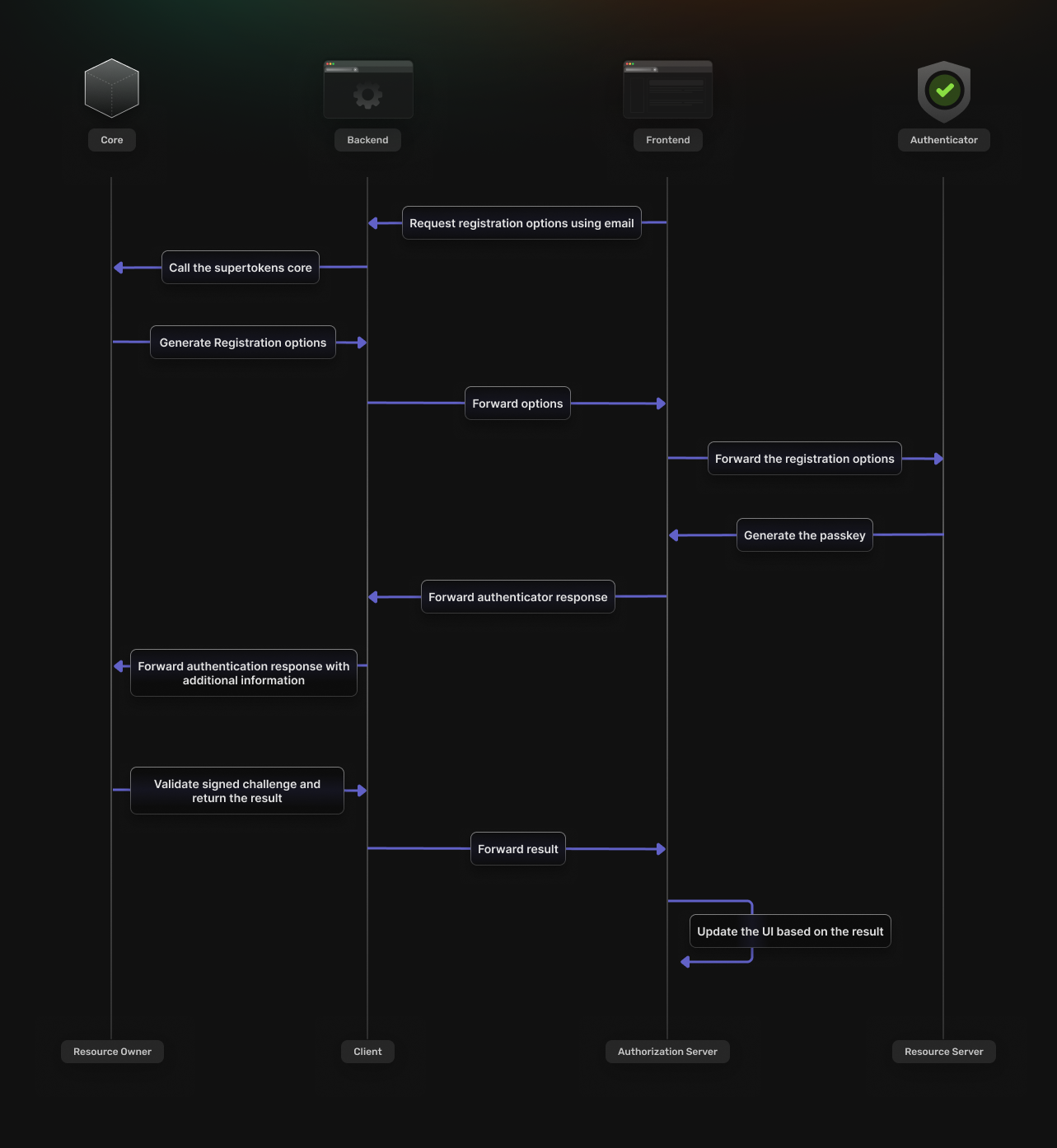
Login
The frontend SDK requests authentication options from the backend.
The options are then returned based on the response from the SuperTokens core service.
The browser calls navigator.credentials.get(), and the authenticator signs an assertion with an existing credential.
The backend SDK sends the assertion for validation by SuperTokens Core and creates a session after successful sign-in.
The authentication UI updates, based on the result of the validation process.
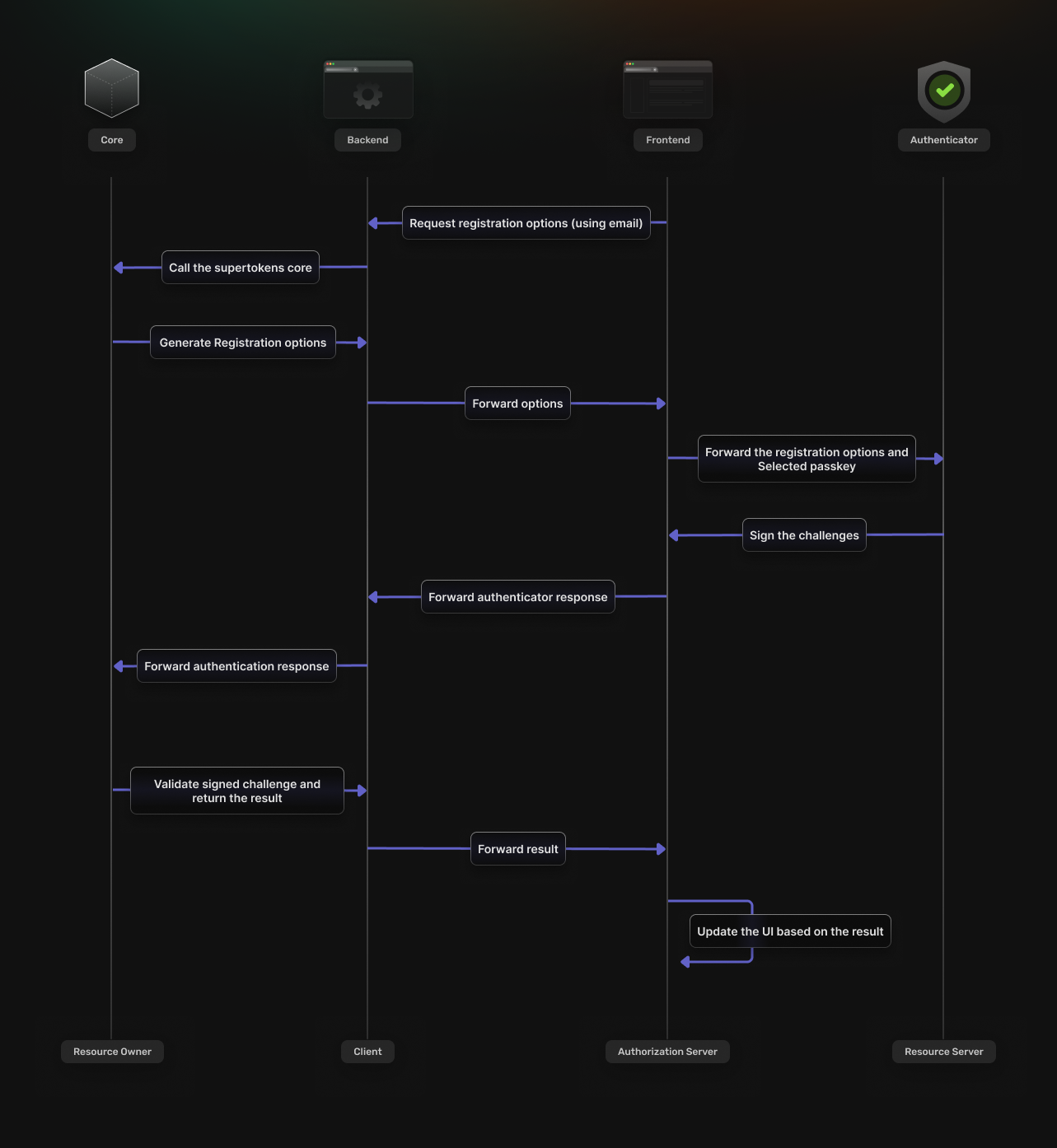
Sign up
The user enters their email address in the frontend authentication UI
The frontend SDK uses the email to request registration options from the backend.
The options are then returned based on the response from the SuperTokens core service.
The browser calls navigator.credentials.create(), and the authenticator creates a credential and returns an attestation response.
The backend SDK sends the registration response for validation by SuperTokens Core and creates the account and session after successful sign-up.
The authentication UI updates, based on the result of the validation process.
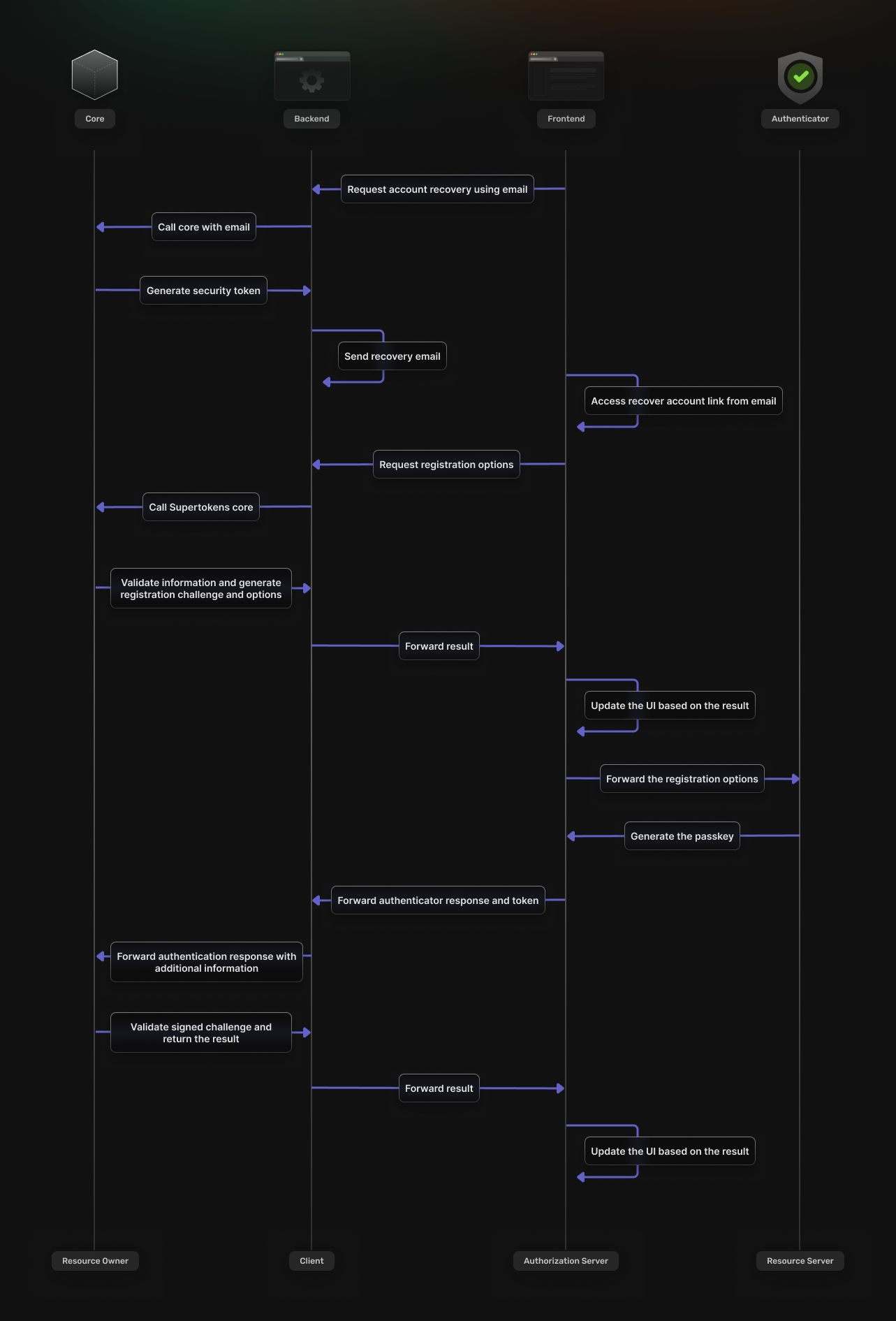
Account recovery
SuperTokens account recovery uses an email containing a link to a page where the user can register a new credential.
The frontend initiates the recovery flow by communicating with the backend SDK
The backend checks if the email exists and then sends a recovery email.
The email includes a security token obtained from the SuperTokens core.
When the user accesses the recovery link, they get directed to the frontend application.
The security token gets validated by the backend SDK. If successful, the SDK begins the process of registering a new credential. From here, the flow matches the one described in the previous sections.